
I built a gaming PC on a $2,000 budget in October 2026, with a six-core Ryzen 5 9600X, a 16GB Radeon RX 9060 XT, 32GB of memory and a 2TB SSD behind one sheet of curved glass.

The budget also covered a 27-inch 4K monitor, and the memory cost almost as much as the graphics card.
I bought eight of the nine parts from Amazon on October 6, 2026 and built the PC alone at home in Sacramento on October 11 and 12. ASUS provided the case for a campaign to build a custom gaming PC in it. I am giving the computer away when I am done with it.
✦ Key Takeaways
- Eight parts cost $2,090.18 before tax on October 6, 2026, and $2,278.07 after $182.89 in sales tax and a $5.00 California recycling fee.
- The graphics card and the memory were nearly the same price. The ASUS Dual Radeon RX 9060 XT 16GB was $529.00 and 32GB of DDR5-6000 was $509.99.
- The tower’s seven bought parts came to $1,900.19. The 27-inch 4K Acer monitor was the other $189.99.
- The processor and graphics card are the two parts meant to be replaced in a year or so. The motherboard, power supply, memory, SSD and case were chosen to stay.
- CES 2027 runs January 6 to 9 in Las Vegas. AMD has extended support for the AM5 socket this PC uses through 2029, so a newer processor can go on the same motherboard.
- A prebuilt with the same processor and graphics card was $1,759.96 on Amazon on October 12, 2026, $300.22 less than the parts in my tower with the case at list price.
- The four case fans share two connections, a four-pin plug for the motors and a three-pin plug for the LEDs. With the motor plug unconnected, the PC powered on with none of the four turning.
- The memory ran at 4800MHz on first boot because its 6000MHz EXPO profile is disabled until it is switched on in the BIOS.
What Each Part of the $2,000 PC Build Cost

| Part | What I Bought | Paid | Share of the Budget |
|---|---|---|---|
| Processor | AMD Ryzen 5 9600X | $174.00 | 8.3% |
| Motherboard | ASUS B650E MAX Gaming WiFi | $167.32 | 8.0% |
| Graphics card | ASUS Dual Radeon RX 9060 XT 16GB | $529.00 | 25.3% |
| Memory | TEAMGROUP T-Create Expert DDR5, 32GB (2 x 16GB), 6000MHz CL30 | $509.99 | 24.4% |
| SSD | Samsung 9100 PRO 2TB | $349.99 | 16.7% |
| Power supply | ASUS Prime 850W Gold (AP-850G) | $132.99 | 6.4% |
| CPU cooler | Thermalright Peerless Assassin 120 SE ARGB | $36.90 | 1.8% |
| Monitor | Acer Nitro VG270K L1, 27-inch 4K | $189.99 | 9.1% |
| Case | ASUS Prime AP304 ARGB, black | Provided by ASUS | |
| Eight bought parts | $2,090.18 | 100% |
The graphics card was $529.00 and the two sticks of DDR5 were $509.99, a gap of $19.01. That memory was almost three times the price of the processor.
Sales tax added $182.89 and California’s electronic waste recycling fee added $5.00, which brought the two orders to $2,278.07.
The monitor is $189.99 of the pre-tax figure, so the seven parts inside the tower came to $1,900.19. Adding the case at ASUS’s $159.99 list price puts the whole list at $2,250.17 before tax. Neither order includes Windows.
The budget assumes a gaming keyboard and mouse are already on the desk. For a build that needs both, I would start with Razer. The BlackWidow V4 X keyboard is $129.99 and the wired DeathAdder V3 mouse lists at $69.99 on Amazon, which adds $199.98.
What a Similar Prebuilt Gaming PC Costs
A prebuilt with this processor, this graphics card, 32GB of memory and a 2TB SSD was $1,759.96 on Amazon on October 12, 2026. That is $300.22 less than the parts in my tower, counting the case at its list price, and the Centaurus Pollux M5 comes with Windows 11 Pro.
| Where | System | Processor | Graphics Card | Memory, SSD | Price |
|---|---|---|---|---|---|
| My build | Seven tower parts plus the case at list | Ryzen 5 9600X | Radeon RX 9060 XT 16GB | 32GB, 2TB | $2,060.18 |
| Amazon | Centaurus Pollux M5 | Ryzen 5 9600X | Radeon RX 9060 XT 16GB | 32GB, 2TB | $1,759.96 |
| Micro Center | PowerSpec G732 | Ryzen 7 7700X | GeForce RTX 5060 Ti 16GB | 32GB, 1TB | $1,999.99 |
| Best Buy | Thermaltake LCGS View | Ryzen 5 7600X | Radeon RX 9060 XT 16GB | 32GB, 1TB | $1,999.99 |
| Costco | iBUYPOWER Element | Core Ultra 7 265F | GeForce RTX 5060 Ti 8GB | 32GB, 2TB | $1,799.99 |
| Dell | Alienware Aurora | Core Ultra 7 265F | GeForce RTX 5060 Ti 16GB | 32GB, 2TB | $2,829.99 |
Four of the five cost less than my parts, by $60.19 to $300.22. The Alienware cost $769.81 more.
The Amazon, Micro Center, Costco and Dell systems include Windows 11, and Microsoft sells Windows 11 Home for $139.00. Adding it puts my tower at $2,199.18.
The Amazon listing gives its storage as a 2TB NVMe SSD and its memory as 32GB of DDR5-6000, with no maker named for either. Mine are a Samsung 9100 PRO rated at 14,700MB/s and a TEAMGROUP T-Create kit at CL30.
Its power supply is a 500-watt unit rated 80 Plus Bronze, in a micro-ATX case on a B650M motherboard. Mine is 850 watts and 80 Plus Gold, in an ATX case on an ATX board.
It has 802.11ac Wi-Fi, gigabit Ethernet and a one-year warranty. My board has Wi-Fi 6E and 2.5Gb Ethernet, and the parts carry their own warranties: eight years on the power supply, five on the SSD and a lifetime on the memory.
The listing gives no noise figure for its three case fans. Thermalright rates my cooler’s fans at 25.6 dBA, and the board sets a speed curve for each fan header, so I control how loud the PC runs.
Of the other four, only Best Buy’s Thermaltake names its memory, a TOUGHRAM XG kit at 6000MT/s. The Costco, Micro Center and Best Buy listings give their SSDs by capacity alone. Micro Center’s and Best Buy’s are 1TB, Costco’s and Dell’s memory runs at 5200MHz, Costco’s graphics card is the 8GB version, and the Dell ships with a 500-watt power supply.
I priced the prebuilts because I wanted to see how close a custom build could come to one, and what a real comparison looks like at 2026 prices. AI server demand has kept memory contract prices rising all year, according to TrendForce, and the memory and the SSD were 41.1% of what I spent.
The motherboard is the other difference. Mine is a B650E MAX Gaming WiFi with PCIe 5.0 for both the graphics card and the first SSD slot, and the Amazon listing gives its board as a B650M chipset with no model.
Building it myself meant choosing each of those parts by maker and rating. For generic parts at a lower price, a prebuilt is the way to go, and for control over the quality of every part I would build again. I also get a lot of satisfaction from building a computer myself and understanding how it works.
Why a Ryzen 5 and an RX 9060 XT on a $2,000 Budget
I held the budget at $2,000 and picked the processor and the graphics card as the two parts to replace in a year or so. Anything nicer in either spot would have sent the total well past that figure.
The motherboard, power supply, memory, SSD and case are meant to stay. The B650E MAX Gaming WiFi takes AM5 processors up to 170 watts, and the Ryzen 5 9600X is a 65-watt chip. The board’s main graphics slot and its first M.2 slot are both PCIe 5.0.
ASUS recommends a 550-watt power supply for the Dual RX 9060 XT, and the Prime 850W Gold is 300 watts above that. The Dual is 202mm long in a case that takes cards up to 420mm.
The Samsung 9100 PRO is a PCIe 5.0 drive rated at 14,700MB/s, and it sits in the board’s one PCIe 5.0 M.2 slot.
AMD sells the 9600X without a cooler, and the Thermalright that covers it was $36.90.
CES 2027 and the Two Parts I Plan to Replace
CES 2027 runs January 6 to 9 in Las Vegas, about 12 weeks after I finished this PC, and I am going.
AMD used the 2026 show to introduce the Ryzen 7 9850X3D, a desktop gaming processor for the same AM5 socket this build uses.
On May 31, 2026, AMD extended its support for that socket through 2029. The B650E MAX Gaming WiFi is an AM5 board, so I expect to swap the Ryzen 5 9600X for a newer AM5 processor on it and keep the motherboard and the memory.
A PC Built to Be Seen
I earned the CompTIA A+ certification in 2004 or 2005 and built several computers as a teenager and a young adult. I use Apple hardware, and I put a PC together every so often for friends who use them. Each build means choosing parts that belong together, meeting what its owner wants it to do, and making the finished computer beautiful.

ASUS bends one sheet of tempered glass around the front corner of the Prime AP304 ARGB, so the front and the left side are a single window. Four 120mm fans come installed, three on the side and one at the rear, each ringed with 20 LEDs, and a light band spans the base.
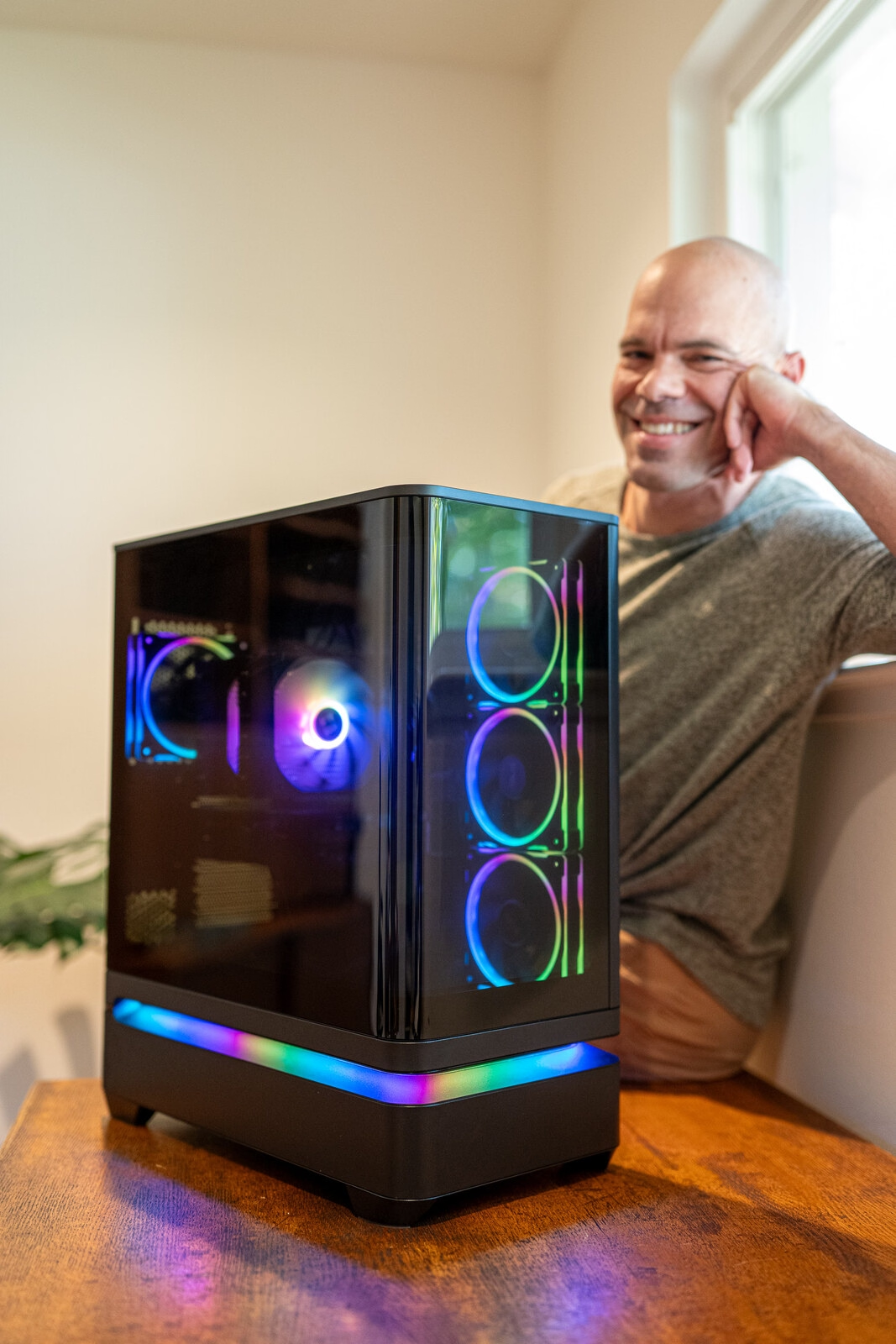
The motherboard, the memory and the graphics card are black, and the color comes from the four case fans, the cooler’s fans and the light band. With the glass on, its dark tint mutes the hardware, and the fan rings and the band are what come through.
The Build, in the Order I Did It
The build took me about five hours, including the time I spent taking photos. Connecting the cables to the motherboard was the most tedious part of it.
The usual advice is to fit the processor, memory and cooler to the motherboard on top of its box. I screwed the bare board into the case first, because the AP304 is roomy enough to work inside, and did the rest with the case on its side.
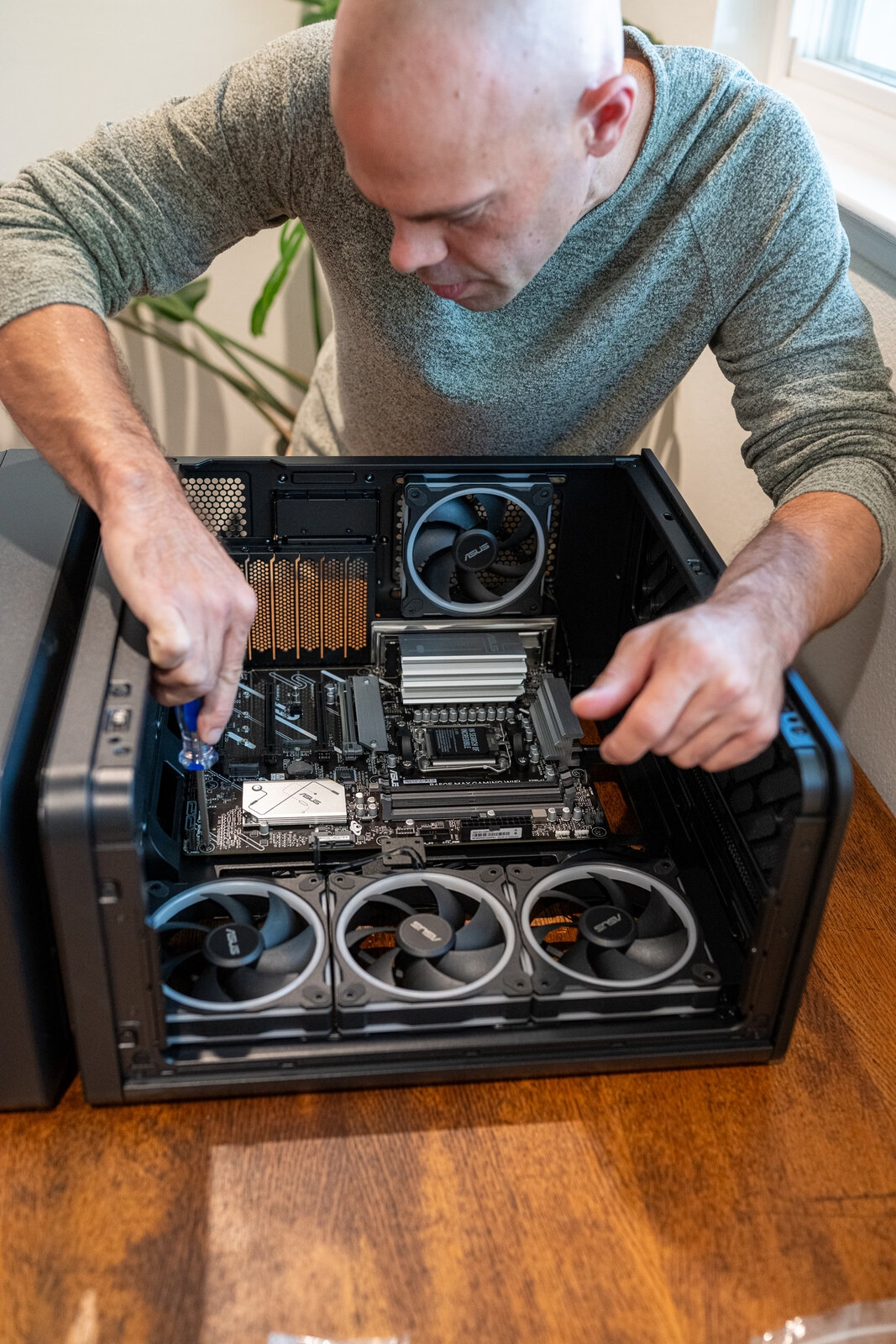
The Ryzen 5 9600X went into the socket by its corner triangle. The two memory sticks went into the second and fourth slots from the processor, which the board labels A2 and B2. The Samsung drive went under the upper silver heatsink, in the slot marked M.2_1.
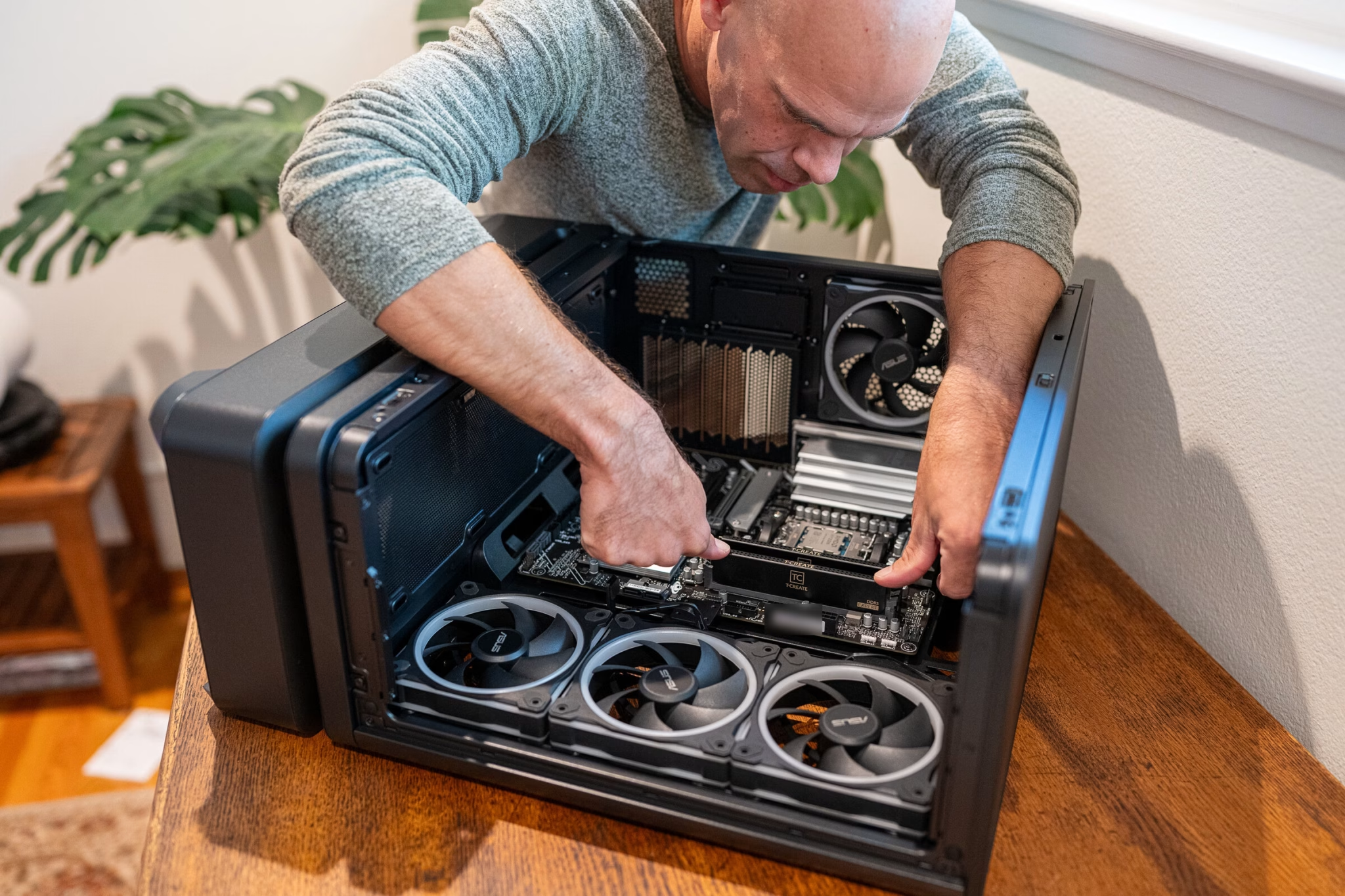
The Thermalright cooler reuses the backplate that comes on the board. I took off the two plastic AM5 brackets, set four red spacers on the posts and bolted two curved silver bars across them.
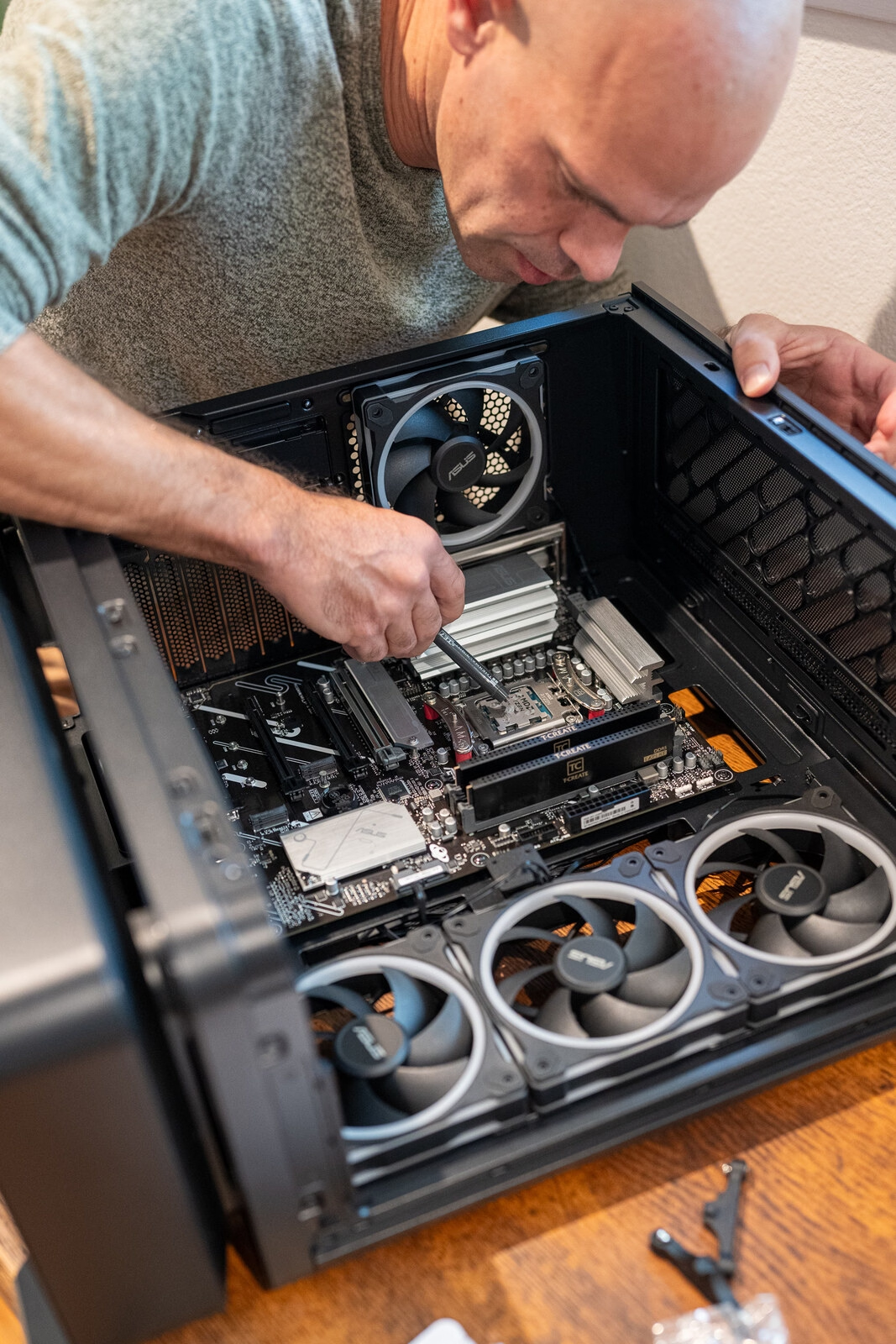
I applied thermal paste to the processor and screwed the heatsink down onto those bars. Its two fans push air toward the fan at the rear of the case.
Each cooler fan has two leads, one for the motor and one for the lights, and both were too short to reach behind the motherboard tray. I tied them along the top of the chassis with twist ties, clear of the fans and the heatsink.
The power supply is the AP-850G, which is fully modular, so every cable plugs in at both ends. I installed it upside down on purpose, so its fan draws air in at the bottom of the case.
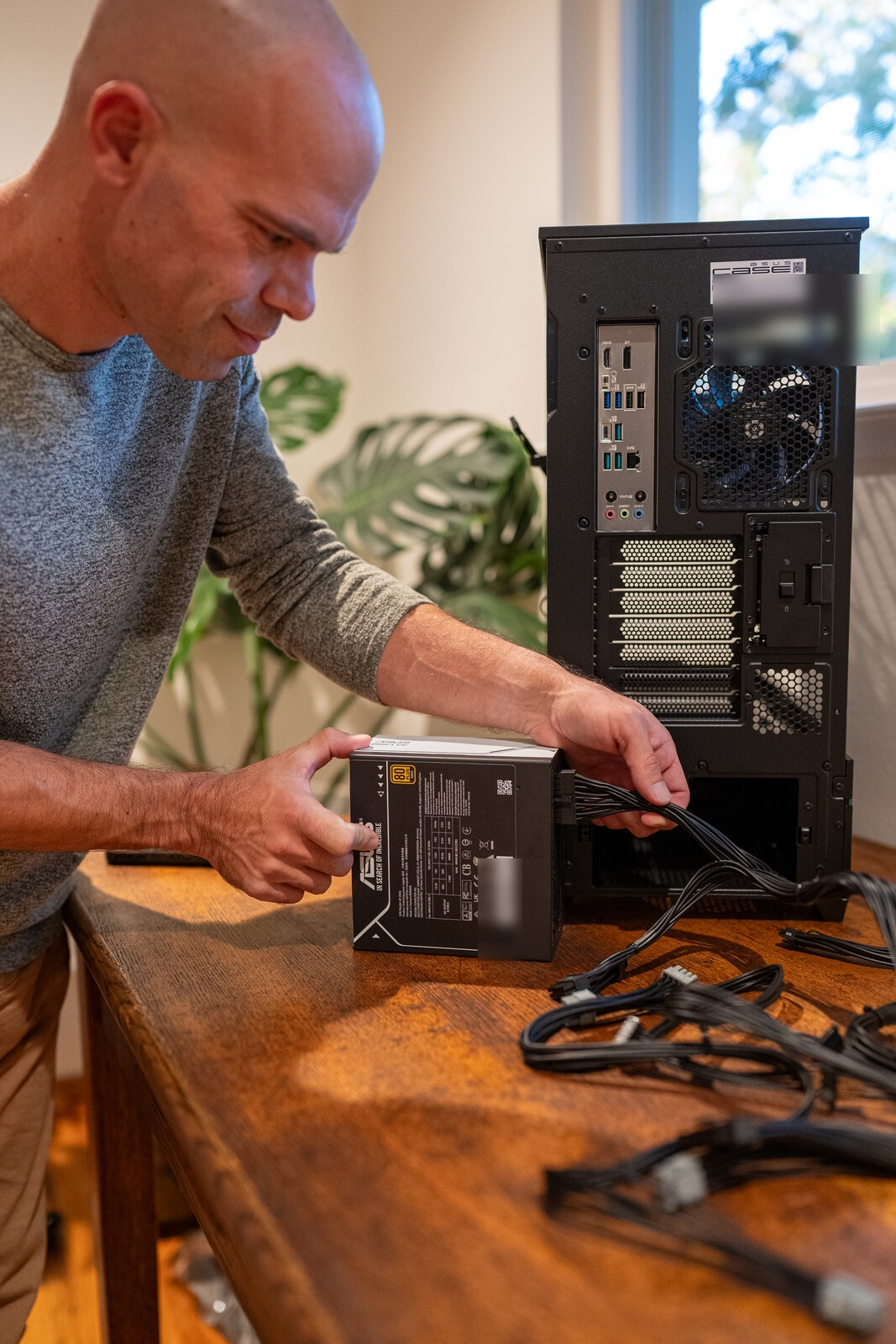
The motherboard cable splits into an 18-pin and a 10-pin plug at the supply. Two gray cables marked CPU run to the top left of the board, where one fills the 8-pin socket and half of the other fills the 4-pin beside it. A separate black cable with a 6+2 plug feeds the graphics card, and the 16-pin graphics cable went unused.
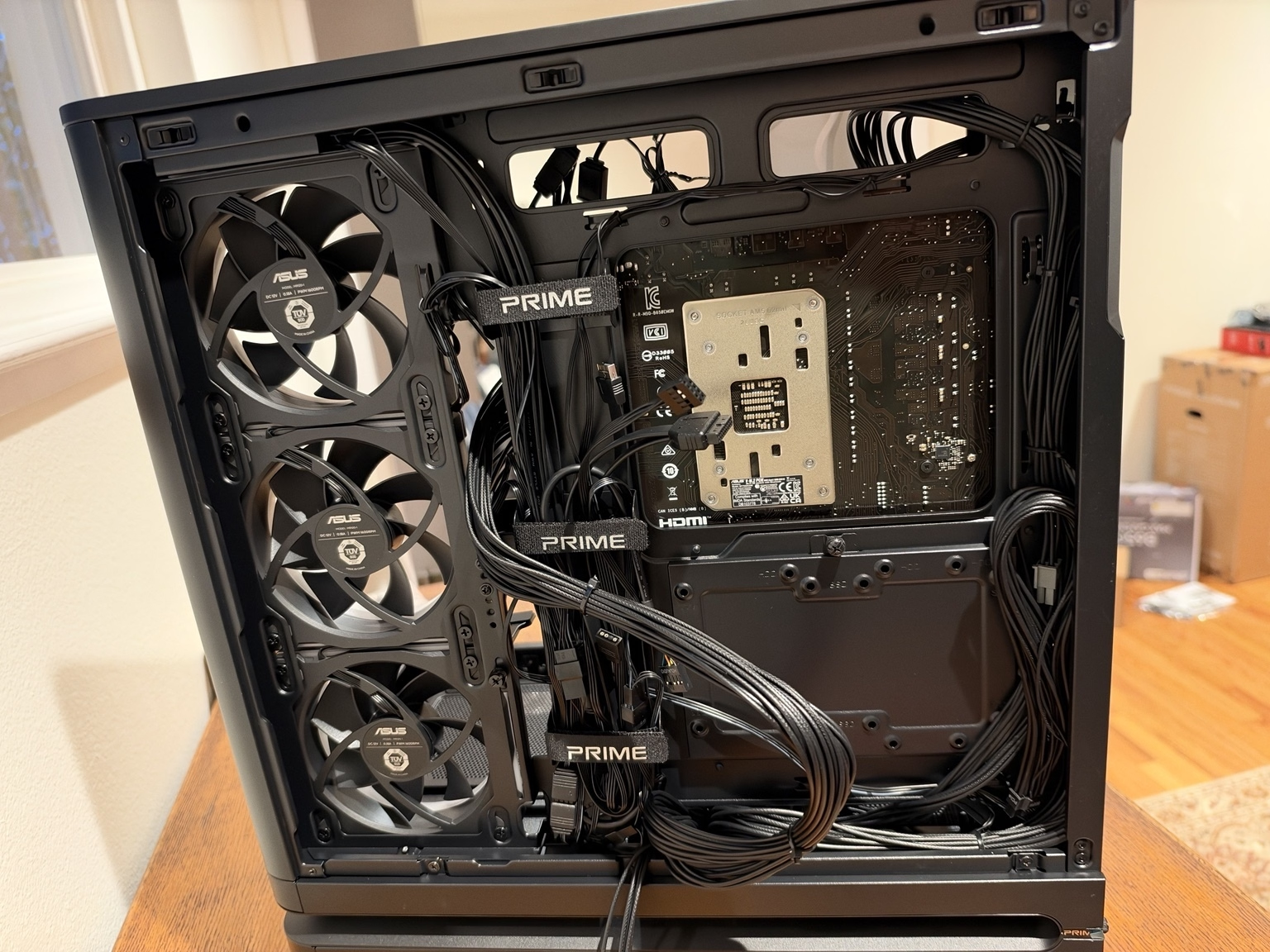
The case’s front panel brings four cables: front audio, one USB header for the two Type-A ports, a USB-C lead that goes to the header the board labels U5G_C7, and a single plug for the power button and its light.
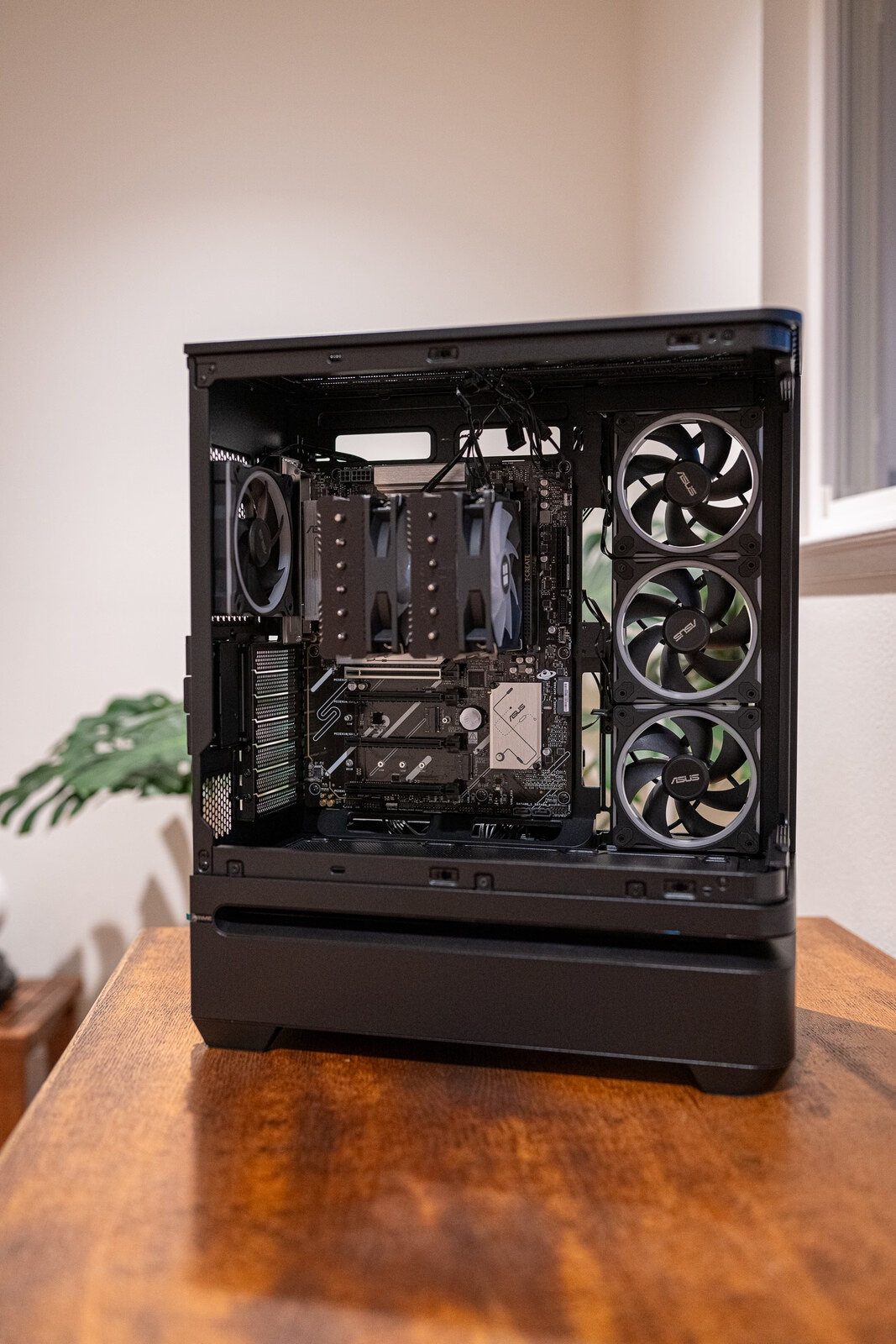
The graphics card went into the top slot with one 8-pin power plug.
Fans Without Lights, Then the BIOS
The first time I pressed the power button, the cooler and the light band along the base of the case lit up and all four case fans sat still. Those four ASUS fans share two connections, a four-pin plug for the motors and a three-pin plug for the LEDs, and the motor plug had been left unconnected.
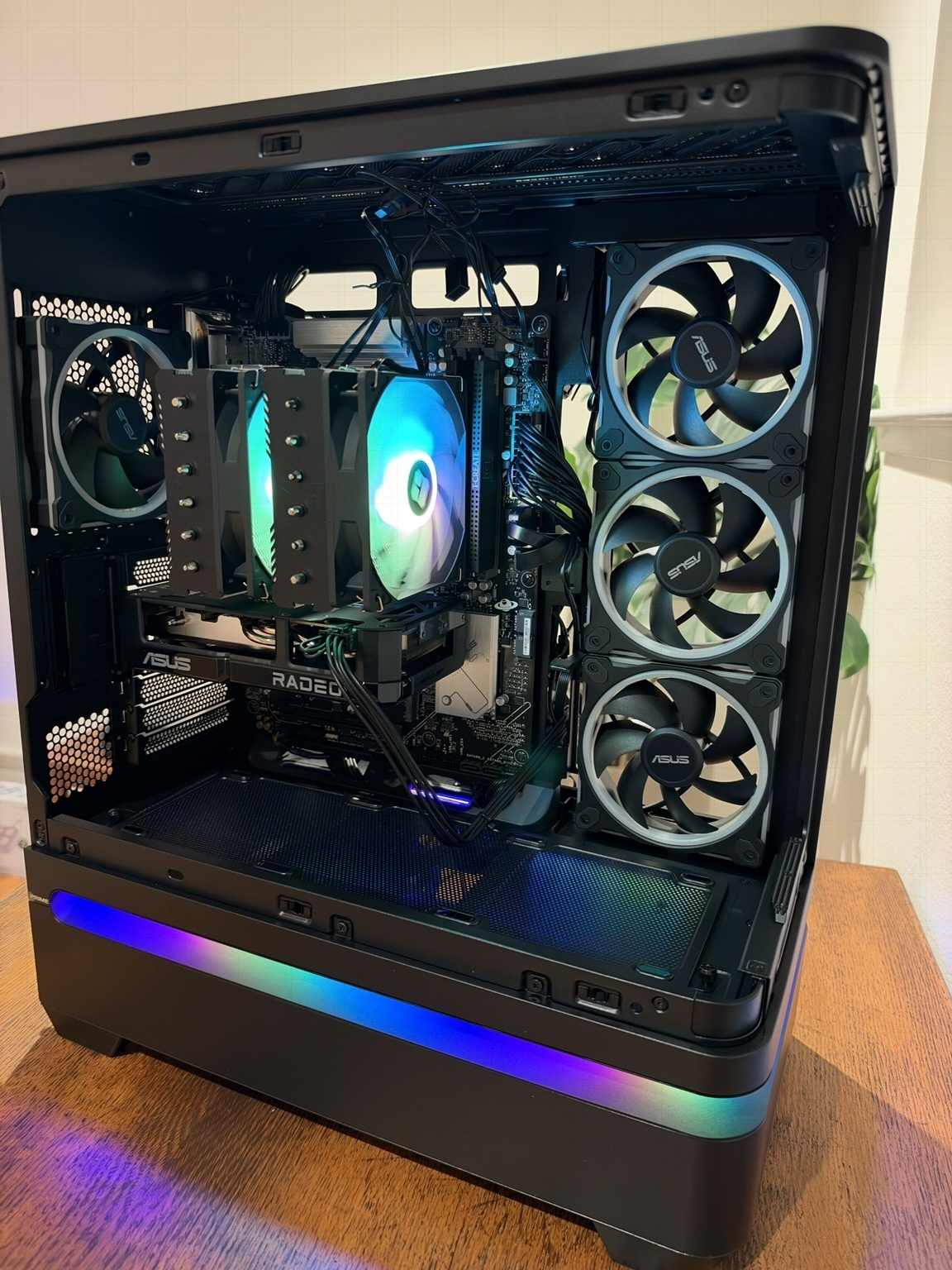
With that plug on a chassis fan header, the four fans spun dark. Their lighting is on a separate three-pin chain, and after I traced that chain to one of the board’s addressable headers the four rings came on.
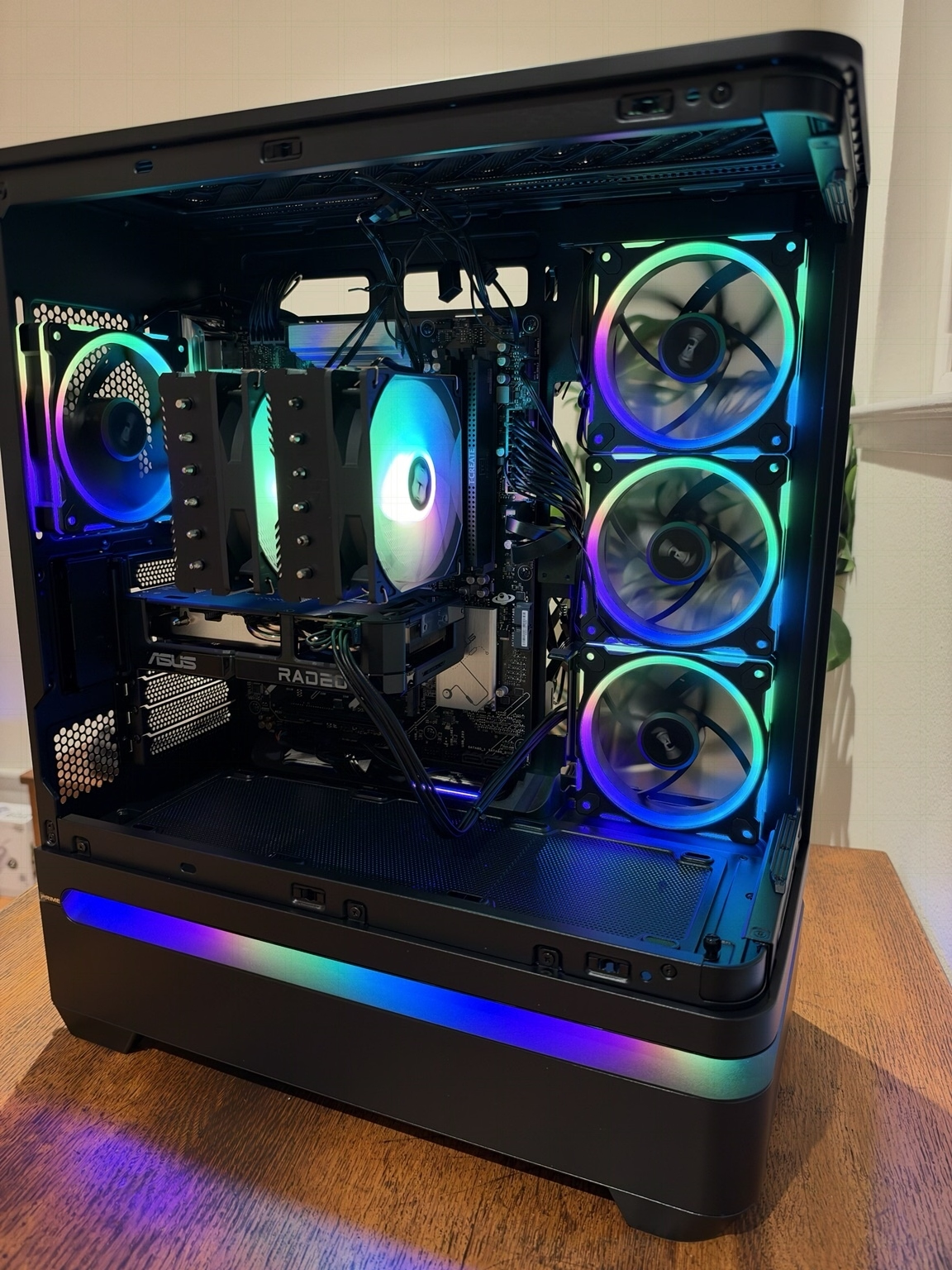
The graphics card’s two fans never turned, because ASUS stops them below 55°C.
The first screen was the ASUS BIOS, version 3854, which is the version the board shipped with. ASUS lists the Ryzen 5 9600X as supported on every BIOS release for this board.
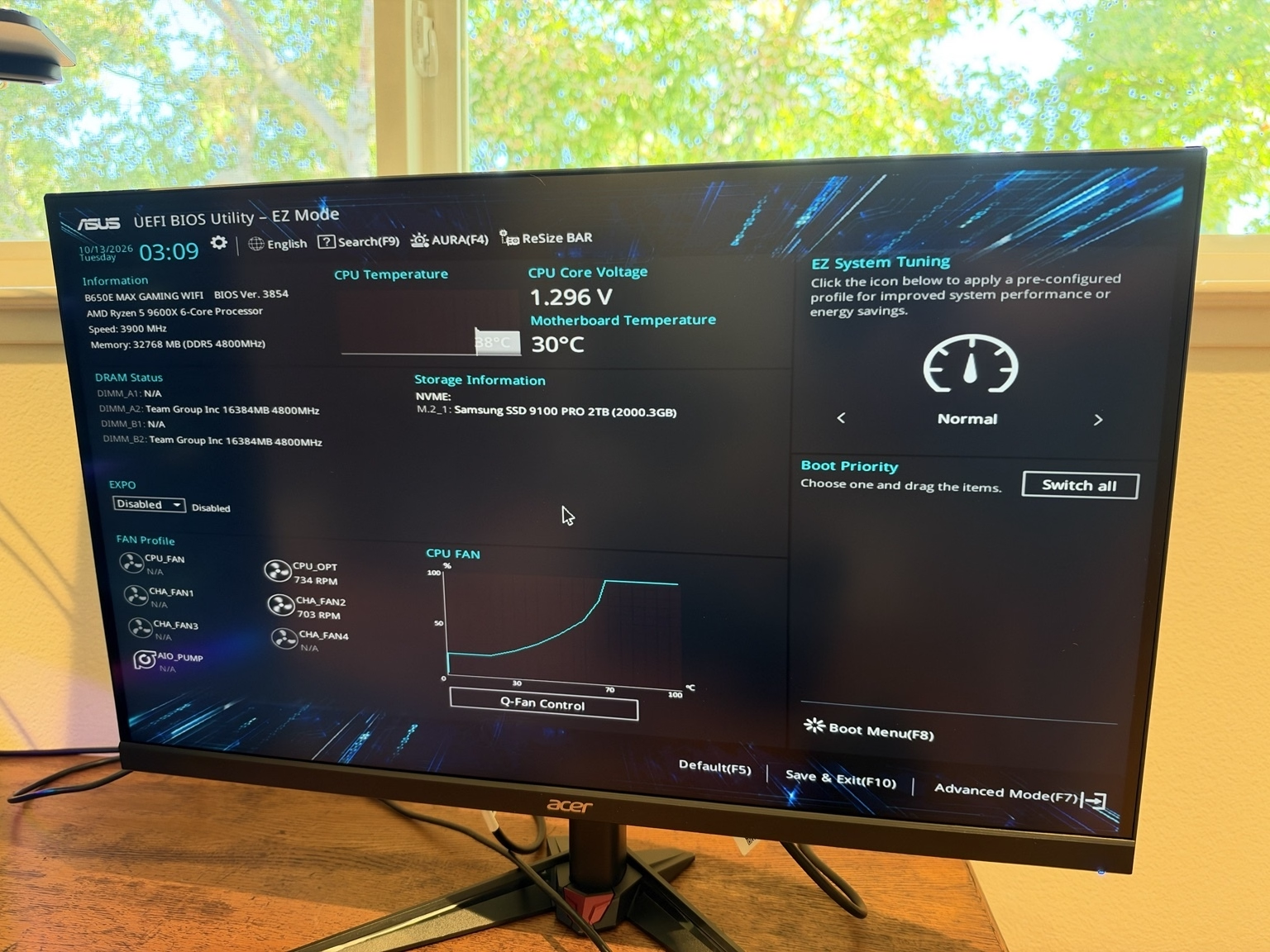
It showed the processor at 38°C, the board at 30°C, 32,768MB of memory in slots A2 and B2, and the Samsung drive in M.2_1 at 2000.3GB.
The memory was running at 4800MHz. Its 6000MHz EXPO profile is disabled out of the box and is switched on from that screen.
The fan readout listed 734 RPM on the CPU_OPT header and 703 RPM on CHA_FAN2, with CPU_FAN reading N/A.
That BIOS screen is as far as the build had gone on October 12, 2026, with Windows still to install.
Where the Parts Did Not Match
The AP304’s graphics card support bracket is rated for cards 300 to 360mm long. The Dual RX 9060 XT is 98mm short of that range.
The USB-C port on top of the case is rated for 20Gbps. The B650E MAX Gaming WiFi’s front USB-C header is a 5Gbps header, so the port runs at 5Gbps.
All four of the case’s fans blow out, and air comes in through the vent in the floor. ASUS’s recommended layout for the AP304 adds three intake fans at the bottom, which are sold separately.
The cooler’s short fan leads stayed in view along the top of the case, and the graphics card’s power cable crosses the lower half of the board on its way up from the floor. Both show through the glass.
Frequently Asked Questions
How much does it cost to build a gaming PC in 2026?
I paid $2,090.18 before tax on October 6, 2026 for eight parts: a Ryzen 5 9600X, an ASUS B650E MAX Gaming WiFi motherboard, an ASUS Dual Radeon RX 9060 XT 16GB, 32GB of DDR5-6000, a 2TB Samsung 9100 PRO, an 850-watt power supply, a Thermalright cooler and a 27-inch 4K monitor. Sales tax and a $5.00 California recycling fee brought it to $2,278.07. ASUS provided the case, which it lists at $159.99.
What does a $2,000 gaming PC build include?
Mine includes a 6-core Ryzen 5 9600X, a Radeon RX 9060 XT with 16GB of memory, 32GB of DDR5-6000, a 2TB PCIe 5.0 SSD, an 850-watt Gold power supply and a 27-inch 4K monitor. The seven parts inside the tower cost $1,900.19 and the monitor cost $189.99. The total leaves out the case, Windows, a keyboard and a mouse.
What is the most expensive part of a gaming PC build?
In my October 2026 build it was the graphics card at $529.00, with memory $19.01 behind it at $509.99 for 32GB of DDR5-6000. The 2TB SSD was third at $349.99. The processor was $174.00.
Does the Ryzen 5 9600X need a BIOS update on the ASUS B650E MAX Gaming WiFi?
Mine did not. ASUS lists the Ryzen 5 9600X as supported on every BIOS release for the B650E MAX Gaming WiFi, and my board started on version 3854, the one it shipped with.
Which M.2 slot should a PCIe 5.0 SSD use on the ASUS B650E MAX Gaming WiFi?
Use M.2_1, the slot under the upper heatsink. It is the board’s only PCIe 5.0 M.2 slot, and the other two run at PCIe 4.0. My Samsung 9100 PRO 2TB showed up there in the BIOS at 2000.3GB.
Why are my PC case fans not spinning when the lights are on?
Fan motors and fan lighting use separate plugs. On my ASUS Prime AP304 ARGB, the four case fans share a four-pin motor lead and a three-pin lighting chain. The motor lead was unconnected at first power-on, and once it was on a chassis fan header all four fans turned.
Why are the fans on my ASUS Dual RX 9060 XT not spinning?
ASUS stops the card’s two fans when the graphics chip is below 55°C. Mine did not turn at the BIOS screen.
Why does my DDR5-6000 memory show 4800MHz?
DDR5 runs at a default speed until its faster profile is switched on in the BIOS. My TEAMGROUP T-Create Expert kit read 4800MHz on first boot with EXPO shown as disabled. The 6000MHz setting is the kit’s AMD EXPO profile.
Does the ASUS Prime AP304 ARGB come with intake fans?
The case ships with four 120mm ARGB fans, three on the side and one at the rear, and ASUS describes all four as exhaust fans. Air comes in through a vent in the floor. ASUS’s recommended layout adds three bottom intake fans, which are sold separately.
Is it cheaper to build a gaming PC or buy a prebuilt?
In October 2026 it was cheaper to buy. The parts in my tower came to $2,060.18 with the case at its list price and no Windows, and a prebuilt on Amazon with the same processor, graphics card, 32GB of memory and a 2TB SSD was $1,759.96 with Windows 11 Pro. That prebuilt has a 500-watt 80 Plus Bronze power supply against my 850-watt Gold unit, and its listing does not name the maker of its memory or its SSD.
How long does it take to build a gaming PC?
This one took me about five hours, including the time I spent photographing it. Connecting the cables to the motherboard was the most tedious part, and it is the step that takes the longest without practice.
Should I wait for CES 2027 to build a gaming PC?
CES 2027 runs January 6 to 9 in Las Vegas. I built in October 2026 on an AM5 motherboard, a socket AMD said on May 31, 2026 it will support through 2029. I chose the Ryzen 5 9600X and the Radeon RX 9060 XT as the two parts to replace in a year or so, and the motherboard, memory, SSD, power supply and case stay.
What power cable does the ASUS Dual Radeon RX 9060 XT 16GB use?
It takes one 8-pin PCIe power plug, and ASUS recommends a 550-watt power supply. I used a 6+2-pin cable from an 850-watt ASUS Prime AP-850G and left the supply’s 16-pin graphics cable unused.
Disclosure: ASUS provided this case for evaluation as part of a creator campaign. I paid for every other part.
Affiliate Disclosure: Some links in this article are affiliate links. If you buy through one, I may earn a small commission at no additional cost to you.
Article Updates
- October 12, 2026: Original publication.